 Hosted Phone System
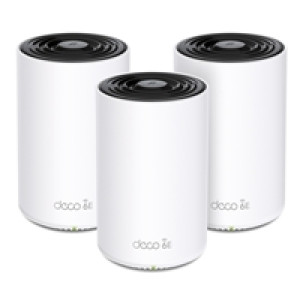 |
TP-Link Deco XE75 Pro(3-pack) AXE5400 Whole Home Mesh Wi-Fi 6E System(Tri-Band), 3 pack |
Stock: 8
Quick Reference: NPTPL-DECOXE753
£527.90
Add to cart >
|
|
|
Whole Home WiFi 6E Cover up to 7,200 ft with next-gen seamless WiFi and make dead zones and buffering a thing of the past True Tri-Band Speed All three WiFi bands work together to unleash your network?s total speeds up to 5,400 Mbps for 200 devices AI-Driven Mesh Unites your home under one name and password while delivering the best connections as you move room to room TP-Link HomeShield Keeps your home network safe with cutting-edge features for network and IoT protection Setup Made Easier Than Ever The Deco app walks you through setup step-by-step Universal Compatibility Backward compatible with all WiFi generations and works with any internet service provider (ISP) and modem Upgrade Your WiFi to 6E WiFi 6E utilizes the capabilities of 6 GHz to enable high-bandwidth applications that require faster data throughput such as high-definition video streaming and virtual reality, as well as lower latency connectivity for online gaming applications. Engineered for Blazing Fast Speed Experience ultra-fast Wi-Fi with more connected devices thanks to the brand-new 6 GHz band. The added 160 MHz channels prevent competition over bandwidth and drops in speed. Cover Every Corner of Your Home Deco XE75 Pro eliminates weak signal areas with clearer, stronger whole-home WiFi generated by BSS (Base Service Station) Coloring and Beamforming technologies as the WiFi dead zone killer. Thus, there will be no more searching around for a stable connection. Fits Any Type of Your House Expand Anywhere You Want Brick and cement. Floors and ceilings. Walls and hallways. All of them make it tough for WiFi to travel across your home. Deco units work together to move WiFi around the obstacles in your home and deliver complete coverage. Engineered for More Devices Deco products are aimed to dramatically improve capacity and efficiency in traffic-dense environments. No matter how many screens or devices are on at once, everyone is able to enjoy a more efficient network that loads faster without dragging down performance. Lightning-Fast Wired Connections A 2.5 Gbps port and 2 Gigabit ports allow you to take full advantage of your broadband speed. Plug your PCs, smart TVs, or game consoles into the ports for blazing-fast wired connections. Intelligent Networking for a Smarter Home Deco uses its custom algorithms to automate the connections on your network, ensuring the strongest possible signals at all times. Seamless Roaming with One Wi-Fi Name TP-Link Mesh means Deco units work together to form one unified network. Your phone or tablet automatically connects to the fastest Deco as you move through your home, creating a truly seamless WiFi experience. Protect Your Network and Everything on It TP-Link?s premium security services keep your home network safe with cutting-edge features for network and IoT protection. Simple. Easy. Yet Powerful. Setup and manage your network anytime and anywhere on the friendly TP-Link Deco app. In just three easy steps your entire home can be blanketed in strong and reliable WiFi. Specifications Standards and Protocols Wi-Fi 6E IEEE 802.11ax 6 GHz IEEE 802.11ax/ac/n/a 5 GHz IEEE 802.11ax/n/b/g 2.4 GHz WiFi Speeds AXE5400 6 GHz: 2402 Mbps (802.11ax, HE160) 5 GHz: 2402 Mbps (802.11ax, HE160) 2.4 GHz: 574 Mbps (802.11ax) WiFI Range 4-7+ Bedroom Houses (3-pack) TP-Link Mesh Technology Optional Ethernet backhaul work together to link Deco units to provide seamless coverage AI-Driven Mesh Intelligently learns the network environment to provide ideal Wi-Fi unique to your home 4x High-Gain Antennas (Internal) Multiple antennas form a signal-boosting array to cover more directions and large areas Tri-Band A newly-opened 6 GHz band brings more bandwidth and faster speeds Beamforming Concentrates wireless signal strength towards clients to expand WiFi range WiFi Capacity Very High Tri-Band Distribute devices to different bands for optimal performance 2x2 MU-MIMO Simultaneously communicates with multiple MU-MIMO clients OFDMA Simultaneously communicates with multiple WiFi 6 clients 6 Streams More than enough bandwidth for connected devices Working Modes Router Mode Access Point Mode Network Security SPI Firewall Access Control HomeShield Security Real-Time IoT Protection Malicious Site Blocker Intrusion Prevention System DDoS Attack Prevention Home Network Scanner Guest Network 1x 6 GHz Guest Network 1x 5 GHz Guest Network 1x 2.4 GHz Guest Network VPN Server OpenVPN Server PPTP VPN Server L2TP/IPSec VPN Server VPN Client OpenVPN Client PPTP VPN Client L2TP/IPSec VPN Client WiFi Encryption WPA-Personal WPA2-Personal WPA3-Personal Ethernet Ports 1x 2.5 Gbps Port + 2x Gigabit Ports Per Deco Unit Supports WAN/LAN auto-sensing Buttons Reset Button Protocols IPv4 IPv6 Service Kits HomeShield Parental Controls HomeShield Parental Controls Custom Profiles Professional Content Filter Library Family Time Bedtime Off Time Time Rewards Family Online Time Ranking Pause the Internet Weekly and Monthly Reports WAN Types Dynamic IP Static IP PPPoE PPTP L2TP Quality of Service HomeShield QoS QoS by Device Cloud Service OTA Firmware Upgrade TP-Link ID DDNS NAT Forwarding Port Forwarding UPnP IPTV IGMP Proxy IGMP Snooping Bridge Tag VLAN DHCP Address Reservation DHCP Client List Server DDNS TP-Link Management Features Deco App Network Services Enabled by Default Web Server Manage and configure device through web (HTTP/HTTPS) Port: 80/443 Protocol: TCP DNS Port: 53 Protocol: TCP & UDP DHCP Server IP address assignment (DHCP) Port: 67 Protocol: UDP App management Manage and configure device through app Port: 22 Protocol: TCP Port: 20001 Protocol: TCP Port: 30001 Protocol: TCP Port: 20002 Protocol: UDP WiFi Transmission Power CE: <20 dBm (2.4 GHz) <23 dBm (5 GHz) <23 dBm (6 GHz) FCC: <30 dBm (2.4 GHz) <30 dBm(5 GHz) <30 dBm(6 GHz) Dimensions (W x D x H) 4.1 x 4.1 x 6.7 in (105 x 105 x 169 mm) Certifications CE, FCC, RoHS Package Content 3 Deco XE75 Pro units 1 RJ45 Ethernet cable 3 Power adapters 1 Quick Installation Guide |
|

Merry Christmas and Happy New Year
| Phone Lines Closed | 5:00pm, Dec 21st 2023 | to | 9:00am, Jan 3rd 2024 |
| Office Closed | 5:00pm, Dec 21st 2023 | to | 9:00am, Jan 10th 2024 |
Registered Office
13 Church Street, Oswestry, SY11 2SU.
13 Church Street, Oswestry, SY11 2SU.
Company Registered in England.No. 10623510
VAT Registration Number: 262586385
© Brunel Computing Ltd 2026 VAT Registration Number: 262586385
(216.73.216.233)