 Hosted Phone System
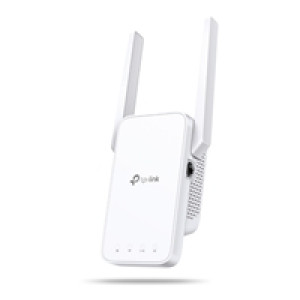 |
TP-Link RE315 AC1200 Wi-Fi Range Extender |
Stock: 15
Quick Reference: NPTPL-RE315
Sale
RRP: £44.65
£42.42 Add to cart >
|
|
|
Eliminate weak signal areas with whole home WiFi coverage. 2.4 GHz (300 Mbps) and 5 GHz (867 Mbps) dual-band WiFi connection ensures more stable wireless experience. EasyMesh-Compatible - Flexibly creates a Mesh network by connecting to an EasyMesh-compatible router for seamless whole-home coverage Adaptive Path Selection ? connects to the fastest connection path to the router automatically and runs at top-speed. AP Mode ? create a new Wi-Fi access point to enhance your wired network with Wi-Fi capability. Smart signal indicator helps to find the best location for optimal Wi-Fi coverage by showing the signal strength. Push the WPS button to easily connect to the router and you can uniformly manage from the Tether app or Web UI. Works with any Wi-Fi router or wireless access point Boost Whole Home WiFi with Your Existing Router A single router has limited WiFi coverage and always causes WiFi dead zones. RE315 wirelessly connects to your existing router and expands its WiFi signal into areas it can?t reach on its own. Enjoy your stable network experience wherever you are at home. Flexibly Create Whole Home Mesh WiFi If you have any dead zones at home, just add another EasyMesh-compatible router/range extender to further form your whole home multi-gigabit mesh WiFi. No more searching for a stable connection. Faster Dual Band WiFi up to 1200 Mbps RE315 delivers dual band (2.4 GHz and 5 GHz) to transmit WiFi signals, doubling the performance of each band. It enables you to keep more devices connected at the same time with its 300 Mbps 2.4 GHz and 867 Mbps 5 GHz dual bands. Use the 2.4 GHz band to send email and browse the web and the 5 GHz band for gaming and HD streaming. Adaptive Path Selection: Keeps Itself Working at Top Speed Adaptive Path Selection keeps your network running at optimal speeds by automatically choosing the fastest connection path to the router. Always keep your devices fast and stable?ideal for network environments crowded with many devices and applications. Built-In Access Point Mode RE315 is more than a wireless range extender. Simply plug an Ethernet cable into its Ethernet port and easily turn your wired internet connection into a 2x2 MIMO dual band wireless access point. Secure One-Touch Connection for Easy Setup Step 1: Simply press the WPS button on your router and, within 2 minutes, the WPS button on RE315 will connect to the network. Step 2: Once connected, place RE315 at the best location?without reconfiguration. Find the Best Location with the Smart Signal Indicator The smart signal indicator lets you see signal strength from the existing router at a glance. Easily to find the best place to position your range extender to extend your WiFi. Control at Your Fingertips Set up and manage your WiFi through the TP-Link Tether app from your smartphone (Android, iOS), including TP-Link routers and range extenders. Specifications Working Modes Range Extender/Access Point Interface 1 x 10/100Mbps Ethernet Port (RJ45) Button WPS Button, Reset Button Input Power 100-240V~50/60Hz Max. Power Consumption 9.5W(max power consumption) Dimensions ( W x D x H ) 3.5 x 1.4 x 4.9 in. (89 x 35.0 x 124.1 mm) Antenna 2 External Antennas Wireless Standards IEEE 802.11a/n/ac 5 GHz, IEEE 802.11b/g/n 2.4 GHz Frequency 2.4GHz & 5GHz(11ac) Signal Rate 5 GHz:Up to 867 Mbps 2.4 GHz:Up to 300 Mpbs Working Modes Range Extender/Access Point Reception Sensitivity 5 GHz: 11a 6Mbps: -94dBm, 11a 54Mbps: -77dBm 11ac HT20 MCS0: -94dBm, 11ac HT20 MCS8: -71dBm 11ac HT40 MCS0: -92dBm, 11ac HT40 MCS9: -66dBm 11ac HT80 MCS0: -87dBm, 11ac HT80 MCS9: -62dBm 2.4 GHz: 11g 54Mbps: -78dBm, 11n HT20 MCS7: -76dBm 11n HT40 MCS7: -74dBm Wireless Modes Range Extender/Access Point Wireless Functions Enable/Disable Wireless Radio, Wireless Statistics Wireless Security 64/128-bit WEP, WPA/WPA2-PSK/WPA2-PSK2 encryptions Transmission Power 2.4 GHz =20dBm, 5 GHz =30dBm Network Services Enabled by Default Web Server Manage and configure device through web (HTTP/HTTPS) Port: 80/443 Protocol: TCP DHCP Server IP address assignment (DHCP) Port: 67 Protocol: UDP App management Manage and configure device through app Port: 20001 Protocol: TCP Port: 20002 Protocol: UDP Certification CE, RoHS System Requirements Microsoft Windows 98SE, NT, 2000, XP, Vista or Windows 7, 8, 8.1, 10, MAC OS, NetWare, UNIX or Linux Internet Explorer 11, Firefox 12.0, Chrome 20.0, Safari 4.0, or other Java-enabled browser Package Content Wi-Fi Range Extender RE315 Quick Installation Guide |
|

Merry Christmas and Happy New Year
| Phone Lines Closed | 5:00pm, Dec 21st 2023 | to | 9:00am, Jan 3rd 2024 |
| Office Closed | 5:00pm, Dec 21st 2023 | to | 9:00am, Jan 10th 2024 |
Registered Office
13 Church Street, Oswestry, SY11 2SU.
13 Church Street, Oswestry, SY11 2SU.
Company Registered in England.No. 10623510
VAT Registration Number: 262586385
© Brunel Computing Ltd 2026 VAT Registration Number: 262586385
(216.73.216.48)